---
title: Chargebacks
description: This article will summarize how to handle chargebacks in Approach and how the process is specific to your business.
---
[Skip to content](https://support.approach.app/knowledge-base/chargebacks#main-content)
English
Show submenu for translations
[](https://support.approach.app/knowledge-base?hsLang=en)
- Home
- Products
- Pricing
- Blog
- Company
Open main navigation
Close main navigation
- Home
- Products
- Pricing
- Blog
- Company
- English
Show submenu for translations
- [Contact us](https://share.hsforms.com/1-n8QjFL3Rfiu-MkWDeoqcwnvfva)
[Contact us](https://share.hsforms.com/1-n8QjFL3Rfiu-MkWDeoqcwnvfva)
Welcome to Approach!
- There are no suggestions because the search field is empty.
1. [Approach Knowledge Base](https://support.approach.app/knowledge-base?hsLang=en)
2. [Supplemental Information](https://support.approach.app/knowledge-base/supplemental-information?hsLang=en)
3. [FAQs](https://support.approach.app/knowledge-base/supplemental-information?hsLang=en#faqs)
# Chargebacks
## This article will summarize how to handle chargebacks in Approach and how the process is specific to your business.
Table of contents:
[FAQs](https://support.approach.app/knowledge-base/chargebacks#faq)
[Chargeback: Membership payment](https://support.approach.app/knowledge-base/chargebacks#mem)
[Chargeback: Pass, Ticket, Invoice payment](https://support.approach.app/knowledge-base/chargebacks#other)
---
##### What is a chargeback?
A chargeback is a forced reversal of a credit or debit card transaction by a customer's bank. It is initiated when a cardholder disputes a charge—their reasoning is usually due to fraud, billing errors, or undelivered/defective goods/services—resulting in the funds being pulled back from the merchant and returned to the consumer.
##### What are the options?
When a customer disputes a transaction, your funds will be pulled from your account. You have three main options as a merchant: accept the chargeback, fight it (representment), or contact the customer directly to see if you can work something out.
**Please** **note**: a transaction cannot be refunded if it's charged-back. If you'd like to do this, the customer must rescind the chargeback first, then please reach out to [help@approach.app](mailto:%20help@approach.app).
##### **How am I notified?**
You will be notified via your payment processor via the email provided in the onboarding process. To change this email, reach out to [help@approach.app](mailto:help@approach.app) or change it via your processor's portal.
For example, if you use Approach Pay, the processor Fullsteam will reach out to you to ask for representment if you intend to fight the chargeback.
You can also find the transaction in the payment processor's portal via the External ID in the Order. This will match the payment processor's information.
---
#### **It was an autobill Membership payment, what are my options?**
If you are planning on fighting the chargeback, your options will depend on your gym's process for Membership billing and cancellation requirements. Below is a layout based on different, common processes. But overall, more information is best. **Please note**: Approach's CX team does it's best to outline this information for you, and can assist, but you ultimately have the best information based on your business's standard operating procedures. Please use screenshots/recordings from your own environment(s).
**Manual cancellation and Terms**: For this example, my gym uses email cancellations where the member must email my gym with their desired date of cancellation. The terms outline they must give at least one week notice before billing on the 1st of the month.
What to provide:
- Check-in log for Membership usage proof.
- The email with the date/time received (if any).
- The Terms and Conditions set in the [Membership Type](https://support.approach.app/knowledge-base/membership-type-creation?hsLang=en).
- A screen recording of the purchase process for proof of understanding.
- A screenshot of the [Membership History](https://support.approach.app/knowledge-base/an-overview-of-memberships-history-logs?hsLang=en) tab, if relevant.
- Any other processes that are relevant for your gym.
**Support request, Portal purchase, and Terms**: For this example, my gym uses the Support requests for cancellation. The terms outline they must give at least one week notice before billing on the 1st of the month. And the customer purchased the membership on the Portal.
What to provide:
- Check-in log for Membership usage proof.
- Proof of online purchase.
- Screenshot of the Order showing "Online."
- The Terms and Conditions set in the [Membership Type](https://support.approach.app/knowledge-base/membership-type-creation?hsLang=en).
- A screen recording of the Portal purchase process for proof of understanding and Terms acknowledgement. 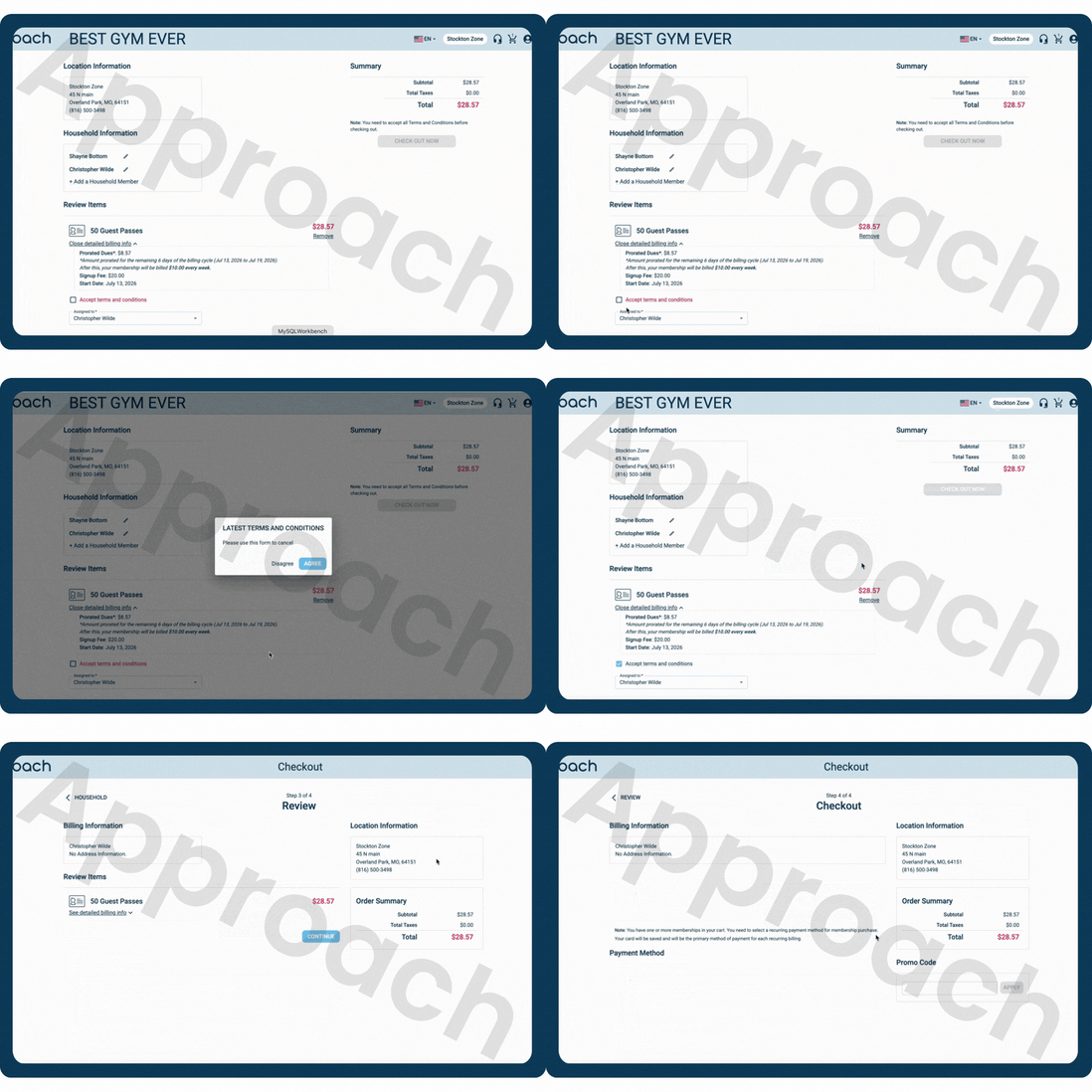
- Their Support request chat history (if any) and process.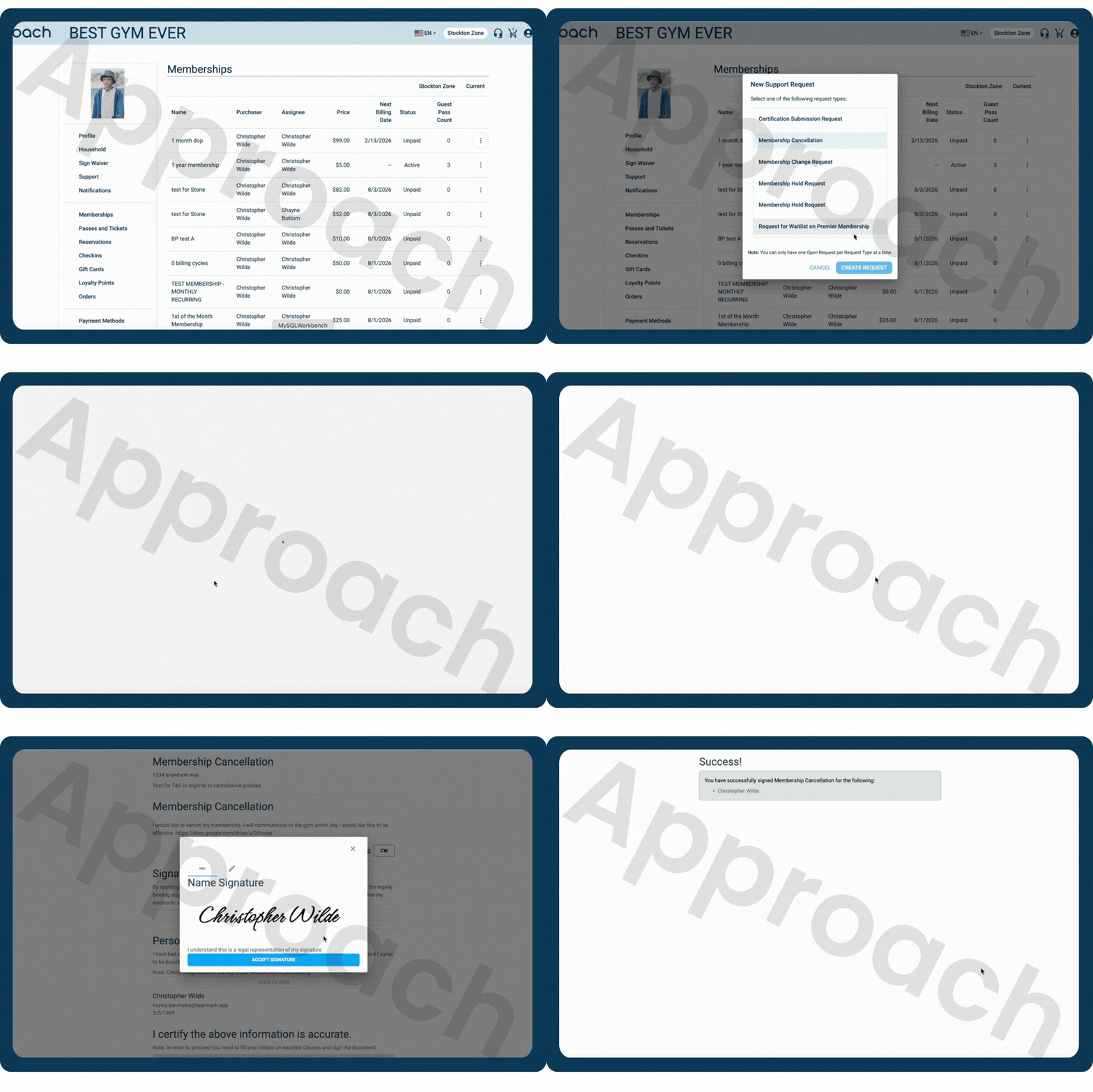
- A screenshot of the [Membership History](https://support.approach.app/knowledge-base/an-overview-of-memberships-history-logs?hsLang=en) tab, if relevant.
- Any other processes that are relevant for your gym.
**Portal cancellation, Terms, and Membership Agreement**: For this example, my gym has set up Membership Cancellation settings in the Membership Type. The terms and cancellation settings outline they must give at least one week notice before billing on the 1st of the month. The customer cancelled on the Portal and signed a [Membership Agreement](https://support.approach.app/knowledge-base/membership-agreements?hsLang=en).
What to provide:
- Check-in log for Membership usage proof.
- The Terms and Conditions set in the [Membership Type](https://support.approach.app/knowledge-base/membership-type-creation?hsLang=en).
- A screen recording of the Portal cancellation process for proof of understanding and access to information.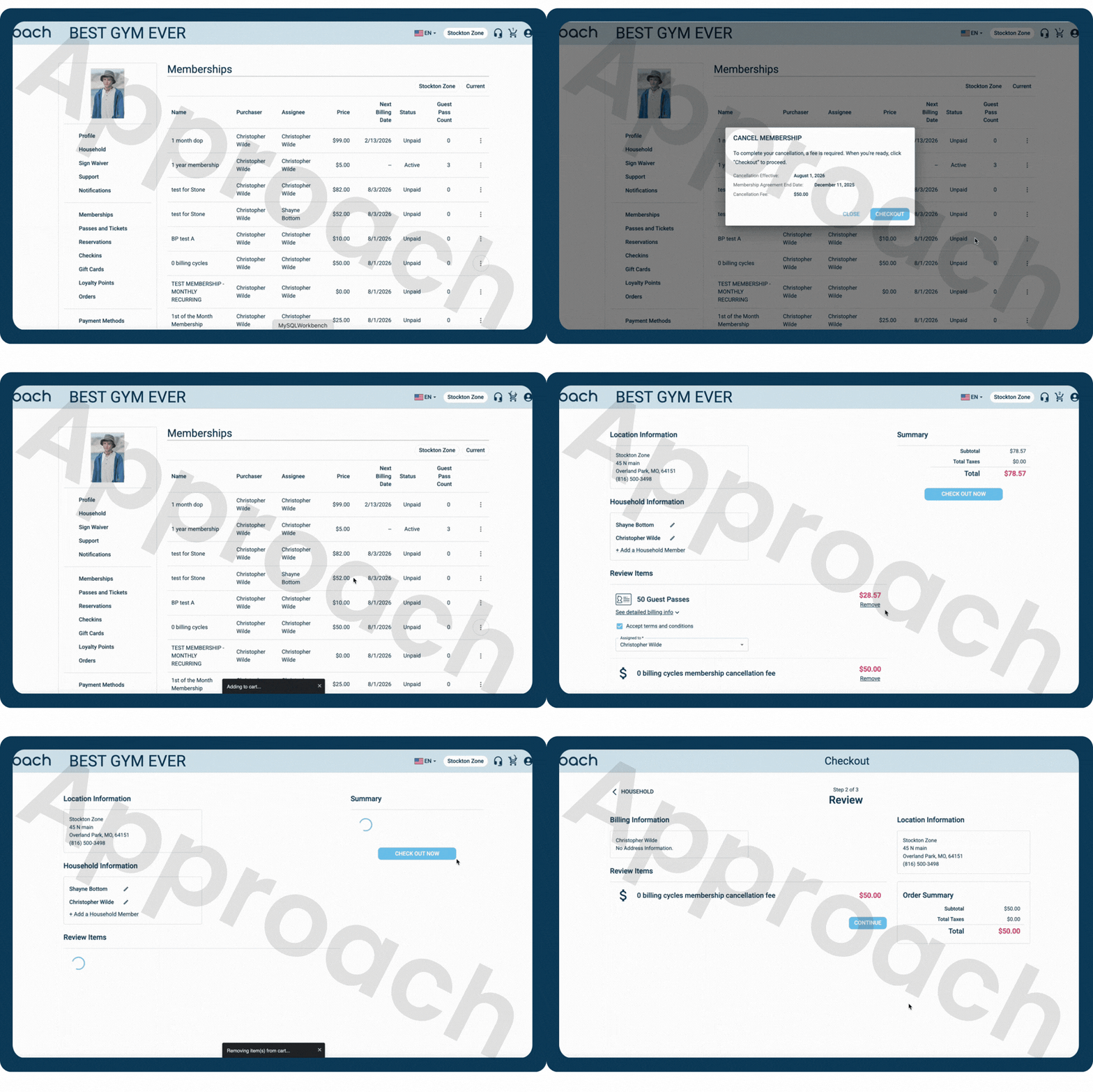
- A screen recording of the signed agreement process.
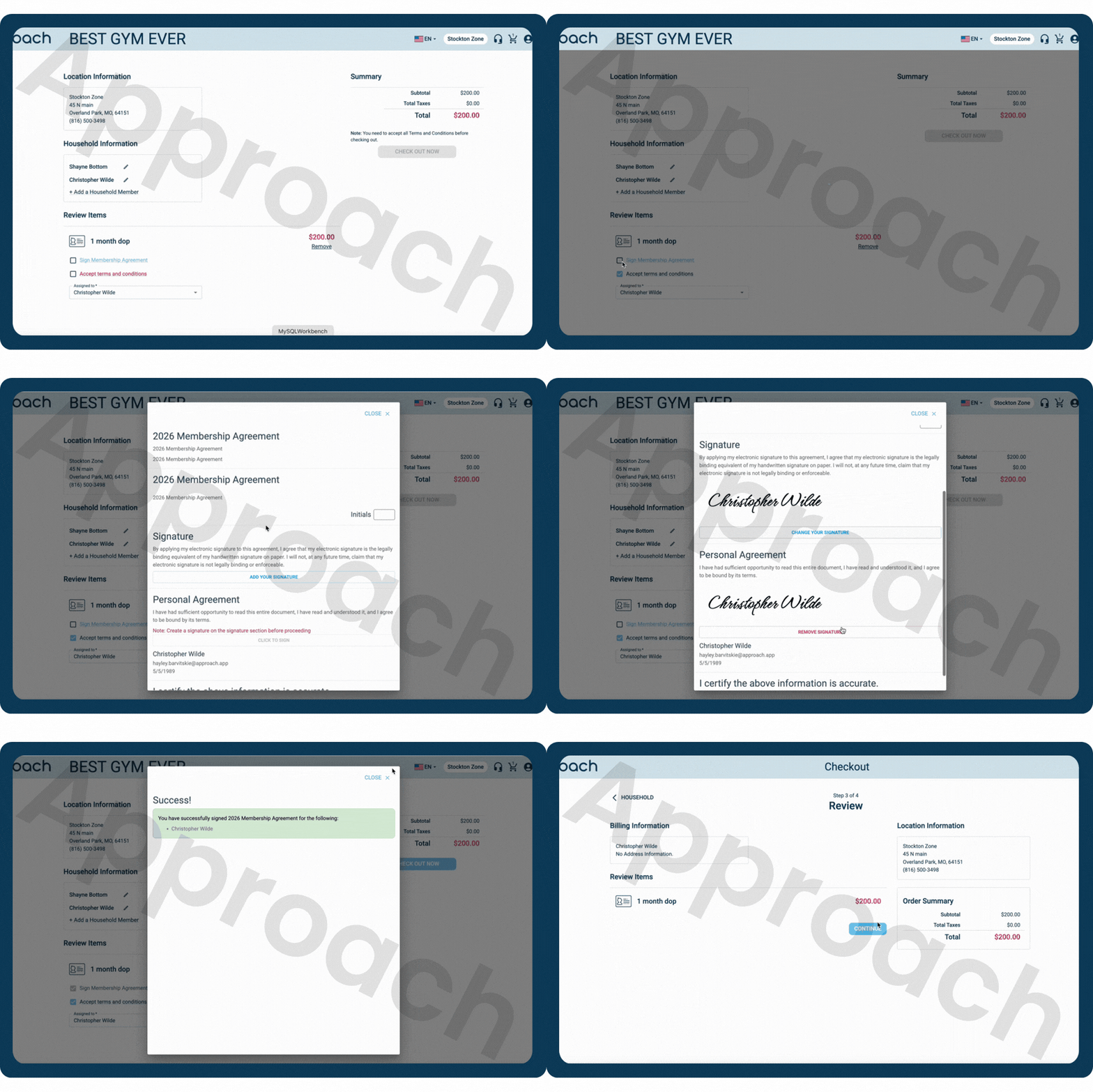
- PDF of the signed Membership Agreement.
- A screenshot of the [Membership History](https://support.approach.app/knowledge-base/an-overview-of-memberships-history-logs?hsLang=en) tab, if relevant.
- Any other processes that are relevant for your gym.
You can use and combination of these depending on your gym's standard procedure for cancellations, if the customer ever attempted to cancel, or your relationship with said customer. Reach out to us if you have any questions or need some assistance: [help@approach.app](mailto:help@approach.app).
#### It was a Pass, Ticket, or Invoice payment, what are my options?
**Pass**
What to provide:
- Screenshot of the Pass Summary.
- The Terms and Conditions set in the [Pass Type](https://support.approach.app/knowledge-base/pass-type-creation?hsLang=en). The expiration settings, if relevant.
- A screen recording of the Portal purchase process for proof of understanding and Terms acknowledgement.
- Check-in log for Pass usage proof.
- Reservation log for Pass usage proof.
- Screenshot of the Order associated.
**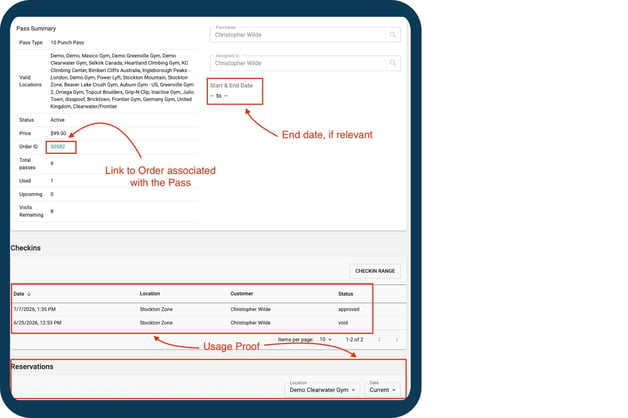**
**Ticket or Multi-day Ticket**
What to provide:
- Screenshot of the Ticket Summary.
- The Terms and Conditions set in the [Ticket Type](https://support.approach.app/knowledge-base/creating-ticket-types?hsLang=en).
- Screenshot of the Event tied to said ticket.
- Screenshot of the Order associated.
- Check-in log for Ticket usage proof.
**Invoice Payments**
What to provide:
- The Terms and Conditions set in the [Pricing Tier](https://support.approach.app/knowledge-base/creating-pricing-tiers?hsLang=en).
- Screenshot of the Invoiced Event.
- PDF of the attendees list and Forms information.
- Found in the Event, from the hamburger in the top right corner.
- Screenshot of the Order(s) associated.
---
- [Setting Up Approach](https://support.approach.app/knowledge-base/setting-up-approach?hsLang=en)
- [Approach Main App](https://support.approach.app/knowledge-base/approach-main-app?hsLang=en#main-content)
- [Calendar](https://support.approach.app/knowledge-base/approach-main-app?hsLang=en#calendar)
- [CRM](https://support.approach.app/knowledge-base/approach-main-app?hsLang=en#crm)
- [Store](https://support.approach.app/knowledge-base/approach-main-app?hsLang=en#store)
- [Forms](https://support.approach.app/knowledge-base/approach-main-app?hsLang=en#forms)
- [Admin](https://support.approach.app/knowledge-base/approach-main-app?hsLang=en#admin)
- [Store Admin](https://support.approach.app/knowledge-base/approach-main-app?hsLang=en#store-admin)
- [Calendar Admin](https://support.approach.app/knowledge-base/approach-main-app?hsLang=en#calendar-admin)
- [Settings](https://support.approach.app/knowledge-base/approach-main-app?hsLang=en#settings)
- [Portal](https://support.approach.app/knowledge-base/approach-main-app?hsLang=en#portal)
- [Kiosk](https://support.approach.app/knowledge-base/kiosk?hsLang=en#main-content)
- [Kiosk](https://support.approach.app/knowledge-base/kiosk?hsLang=en#kiosk)
- [Customer Portal](https://support.approach.app/knowledge-base/customer-portal?hsLang=en)
- [Announcements & Release Notes](https://support.approach.app/knowledge-base/announcements-release-notes?hsLang=en#main-content)
- [Release Notes 2025](https://support.approach.app/knowledge-base/announcements-release-notes?hsLang=en#release-notes-2025)
- [Release Notes 2024](https://support.approach.app/knowledge-base/announcements-release-notes?hsLang=en#release-notes-2024)
- [Supplemental Information](https://support.approach.app/knowledge-base/supplemental-information?hsLang=en#main-content)
- [Integrations](https://support.approach.app/knowledge-base/supplemental-information?hsLang=en#integrations)
- [Set Up Assistance](https://support.approach.app/knowledge-base/supplemental-information?hsLang=en#set-up-assistance)
- [FAQs](https://support.approach.app/knowledge-base/supplemental-information?hsLang=en#faqs)
- [Quicksight Dashboard](https://support.approach.app/knowledge-base/quicksight-dashboard?hsLang=en)
- [Approach Journeys](https://support.approach.app/knowledge-base/approach-journeys?hsLang=en)
- [Onboarding](https://support.approach.app/knowledge-base/onboarding?hsLang=en)
[](https://support.approach.app/?hsLang=en)
Copyright © 2025, Approach