Skip to content
English
  • There are no suggestions because the search field is empty.

How to Save a Payment Card

In this guide we will cover how to save a new payment method to a customer’s profile.

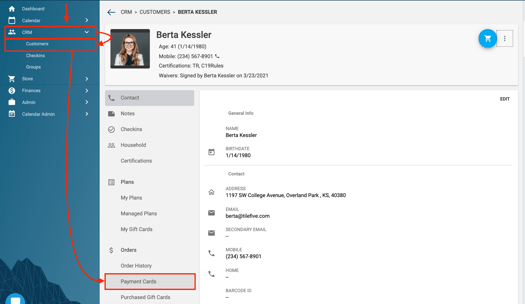
First click into CRM, Customers then open the profile of the customer.
 
Then click Payment Cards
Screen Shot 2021-08-24 at 2.59.13 PM.png
 

Credit Cards

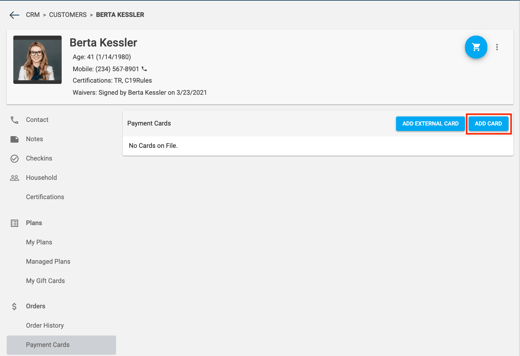
To save a credit card, click Add Card.
 
You will be able to either manually enter or swipe a new card to be saved to their profile.
 
It is important to know that you always want to have a card saved to their profile so any recurring membership can be billed successfully to their account.
 
Remember to click save.
Screen Shot 2021-08-24 at 3.00.25 PM.png
 

External Payment Card

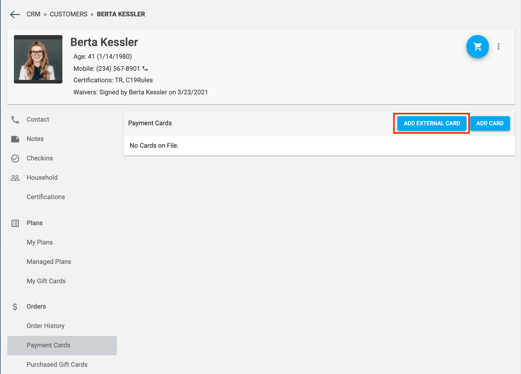
To add an external payment method that is not a chargeable card click Add External Card.
 
This method is for someone, for example is paying by means of a check.  
 
Warning: If this payment method is used and saved to their profile, their membership will continue to remain in active status continually in future billing periods.
Screen Shot 2021-08-24 at 3.00.39 PM.png
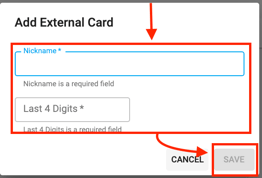
Next, assign a nickname for this payment method and assign 4 digits for your own personal record keeping.
 
Finally, click Save.
Screen Shot 2021-08-24 at 3.01.04 PM.png
 

Important Note: When selling recurring memberships in person, Apple & Google Pay can NOT be used as a saved payment method for recurring payments. However, If a physical credit card is used via tap to pay on the credit card device, it can be stored and used for recurring memebrship billing.

All merchants associated with Approach do support digital wallets for regular, one time/non-recurring payments. For those clients that use digital wallets for a payment, know that the cards last 4 digits will appear differently in your app. This is a security feature of those payment methods that will make for searching by using the last 4 digits impossible. The choice is up to those clients whether to allow those for making one time payments.


Do you still have more questions? We want to make our Knowledge Base as accurate  and as in-depth as possible. If you think this article is missing anything, please let us know here. We will update the article and let you know we have done so!