
Overview
How Customers Are be Affected by Approach Marketing
How to Customize Messaging
Controlling Marketing on an Individual Level
FAQ
Overview
Under Main App Settings/Email/Marketing there is a setting which allows businesses to customize their subscription settings. This enhancement depends on your business using our marketing platform Approach Journeys or Twilio. To learn more, you can book a demo with us here Marketing for Gyms | Approach!
This allows customers the ability to opt in or out of Approach Marketing and also specify which type of marketing they would like (text or email). They can also opt out of all marketing.
If you are utilizing Approach Journeys or Twilio, your customers will be able to adjust their subscription settings with a “Manage Subscription” button, placed at the end of your communications. Hitting the "Manage Subscription" button will bring them to a page on the portal called "Subscription Settings."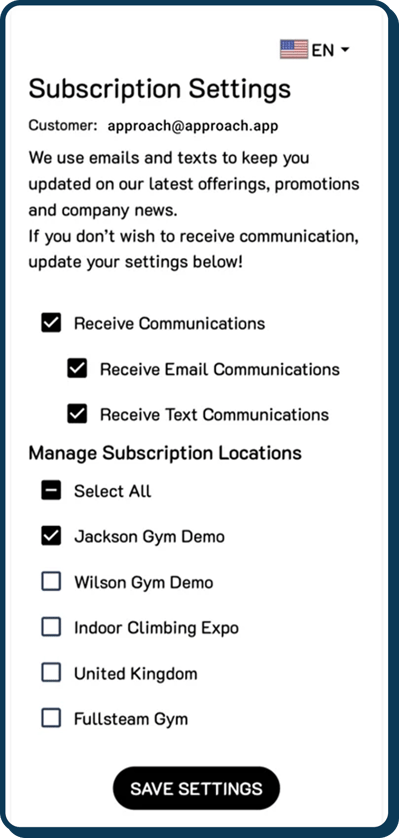
Note: Approach does not send marketing messages for you. It is the medium for the messaging around subscribing and unsubscribing to your marketing communication emails and Texts.
Email marketing is ok with single opt-in permissions. This can be collected at profile creation. Text messaging requires double opt-in. You can get the first step of this double opt-in with profile creation. You will need to collect the second opt-in with your Approach Journeys or Twilio accounts.
If you have more questions around this, please email us at journeys@approach.app.
We know that it's important for businesses to be able to communicate their own marketing expectations to customers, and we love when we can create enhancements that give you the ability to brand and tailor your messaging.
To this end, under Settings/Email/Marketing in the Main App, the following “subscription message” is what your customer will see on the Portal after the customer email (see above!).
To adjust that message to better reflect your business’s communication goals, simply edit below and hit save.
How Customers Are Affected by Approach Marketing?
Approach marketing is only for those that use Twilio and Approach Journeys. You should not enable it if you do not intend to use these products. You will not be able to export customer preferences with other Approach Integrations.
When a customer checks in for the first time at a location, they will be added to the marketing for that location. If that customer doesn't check into other locations, they will not be added to the marketing for those locations. When being added to a location, after checkin, the database defaults that customer to neutral, in terms of their marketing subscription preference. It's up to gym owners on how they want to market in terms of this neutral database status.
Now, when a customer receives a marketing email/text and hits the manage subscription button at the end of that message, that customer has an opportunity to adjust their settings accordingly (receive no messaging entirely, receive only text or email or both) and also do so by location. If they decide against a certain location, the database will capture that they do not want marketing messaging from that location. If they decide for a certain location, the database will capture that they do want marketing messaging from that location.
What's brilliant about this, from a marketing perspective, is that gym owners have the ability to market by people who really want the messaging or are neutral and save on messaging costs for those who don't.
How to Customize Messaging
- First navigate to "settings", then "Email. In the dropdown, click "Marketing".
.png?width=670&height=419&name=Wide%2c%20Template%20(79).png)
- From here you will be able to set up the subsciption messages your customers will see to match your businesses style and branding. You can put any hyperlinks to your terms & conditions and specific state/country law if you would like. This message is total in your control. Remember the styling used here will be reflected on both the kiosk and portal.
Please note, for the custom text subscription message, the check box on the portal and the kiosk will NOT appear if there is no custom text configured in the main app. You can see this in the pictures below. This is due to various state/country laws regarding text opt in.
.png?width=670&height=453&name=Frame%203%20(1).png)
.png?width=670&height=453&name=Frame%202%20(1).png)
Please note, the checkbox for email op-in in both the kiosk and portal will always be checked by default. The checkbox for text opt-in will always be unchecked by default.
Controlling Marketing on an Individual Level
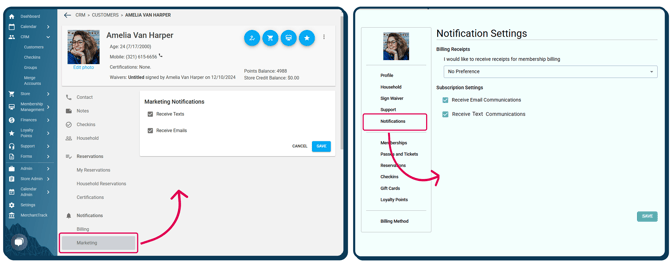
Marketing can be controlled on an indivudal level manually both in the main app by the gym as well as in the portal by the customer.
The main app settings can be found in the individual profile under the marketing tab whereas the portal settings can be found under the notification tab.
FAQ
Can I use Cinch, Mailchimp or Make.com along with Approach Marketing?
No. Approach Marketing is designed to work with Approach Journeys and Twilio.
If you already are using Approach Journeys and need help getting a phase of your marketing going, reach out to journeys@approach.app and we will handle all of your needs!