
Latest Enhancement Latest Bug Fix
Enhancement Updates 🚀
January 8th:
Invalid Locations appearing in Product Inventory
When going to Store Admin > Products > Select a product > Inventory, any and all locations would appear. We've since changed this so only valid locations will appear to avoid any confusion.
First Come, First Serve Entrance Requirements
When attempting to change entrance requirements, we've added an update so this won't change anything on the backend if nothing is changed.
Pagination to "Add Product" component for Receivings and Audits
We noticed some gyms might have more products than the "Add Product" section allowed to view in Receivings and Inventory Audits. This update makes it so any amount of Products will be viewable and therefore allowed to be added in Receivings and Inventory Audits.
January 13:
Notes on Certifications
When giving a Staff or Customer a Certification, you can now add notes if you want to detail the individual's certification details. This is a new section to the certification selection pop-up and notes will appear in the Certifications tab.
January 20th:
"My Plans" Location Permissions Update
Employees can now only cancel, hold, or resume Individual or Shared Memberships and Passes that belong to their own franchise location (if their permission allows). Memberships from other locations remain visible in customer profiles but are view-only and cannot be modified.
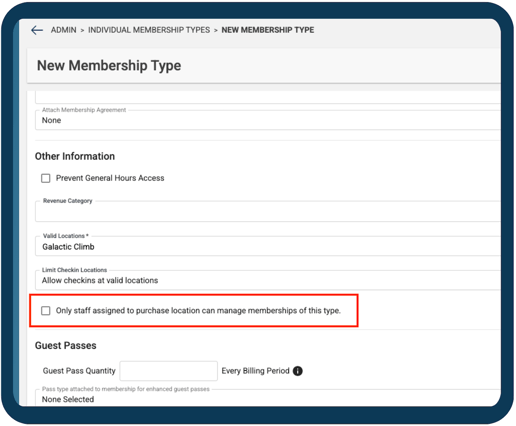
There is also a new checkbox for this on Membership Types: "Only staff assigned to purchase location can manage memberships of this type." This is to control this permissions update.
Calendar Event & Bookings Permissions
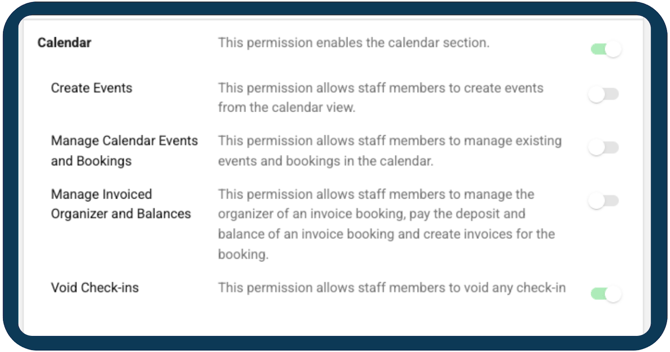
There are new permission controls that can limit management actions on events and bookings across all event types. Staff (the protected role) may only manage events and bookings when permitted, with limited actions still allowed, such as: attendees/guests, notes, and CSV downloads. A separate invoice permission allows editing the invoice organizer and managing balances, even without full event or booking edit access.
Kiosk Barcode Check‑In
We’ve streamlined the barcode check‑in waiver flow at the kiosk!
Members who scan their barcode without the required waiver are now taken directly to the Default Waiver signing flow, instead of selecting the correct document. This aligns with the existing kiosk waiver experience, removes extra steps, and prevents “No Check‑In” notifications from appearing in the main app.
February 10th:
Calendar "Enforce Customer Age Restrictions in the Portal"
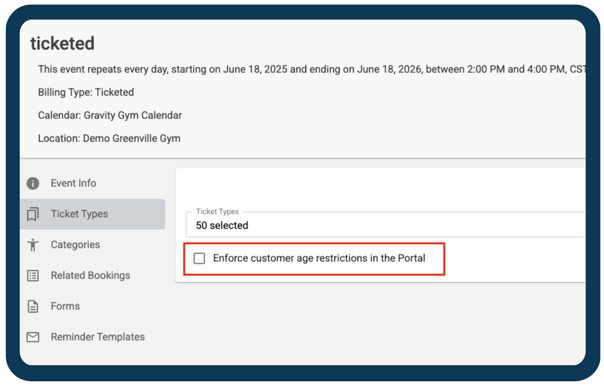
Within a ticketed event under ticket types, there is a new setting under selecting the ticket types. You can check "Enforce Customer Age Restrictions in the Portal" will not allow the ticket for purchase unless the assignee meets those age requirements. This is automatically checked for any new ticketed events.
This is automatically unchecked on existing ticketed events but available.
Portal Ticket Assignments
Previously, when there was an event—regardless of any age restrictions—being purchased in the Portal, the ticket would automatically assign to the purchaser.
Now, when the purchaser goes to checkout on an event, they will have to assign the ticket to themselves or someone within the household. If there are age restrictions within the ticket, the household members that meet that criteria will be the only one(s) available. 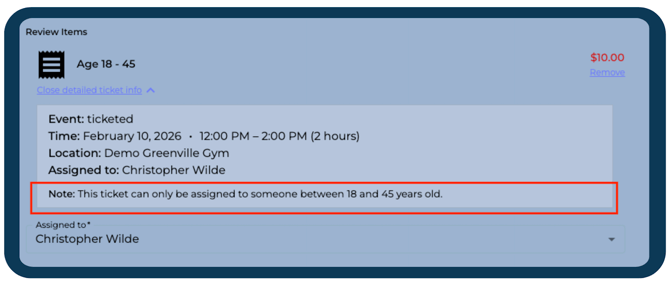
The assignee options will reflect the appropriate age range at the time the event occurs.
February 19th:
Automatically apply Store Credit setting
In the Main App settings, on the Defaults tab, there is a new setting option regarding Store Credit. Here, you can toggle on and off a Default "Automatically Apply store credit in the store cart." This setting can be differed by Location. 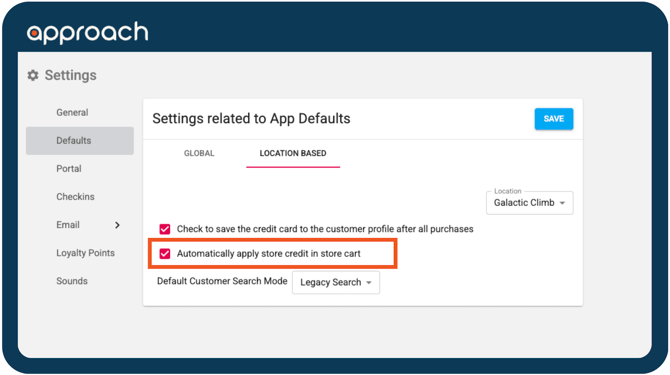
This new setting is defaulted to checked.
February 24th:
Customer Profile Header
We've made some big changes in our Customer Profiles! Here's a breakdown
.png?width=670&height=178&name=Copy%20to%20Clipboard%20(1).png)
Under the customer's name:
- Gym Location Name: Frontier Gym
- Waiver status
- Number of Active Passes
- Number of Active Memberships
- Unsigned/Signed Membership Agreement
- Number of Notes upon check-in
Profile Snapshot:
- Age
- Mobile Phone Number
- Button to Copy the number to Clipboard
- Email
- Button to Copy the email to Clipboard
Status:
- Certifications overview
- Waivers signed overview
- Tenure includes their amount of check-ins and last check-in
March 3rd:
Inventory Audit update
In Inventory Audits, Approach was including any purchased order as an Audit. This started to overshadow staff-made audits so we've updated Inventory Audits to no longer include orders. And Product's inventory will still be adjusted for Purchases. That info can be found in the Adjustment Log within the Product.
Product By Location
We’ve updated the workflow for managing product variants and locations so your existing settings no longer reset when you add new locations or product variants.
This update ensures that all previously set values stay exactly as they are—so adding new variants or new locations won’t disrupt how your existing locations manage their products.
.gif?width=670&height=365&name=Untitled%20(11%20x%206%20in).gif)
Calendar Event Card Update
We've made some updates to the Calendar cards! Here's a breakdown of the additions:
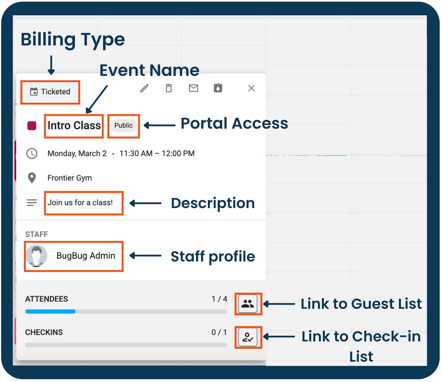 - Billing Type will show Invoice, Ticketed, Multi-day ticketed, or First Come First Serve
- Public or Private will describe the Portal Access
- Staff profile(s) that are associated with the event
- Attendees will include a progress bar, capacity count, and link to the Guest list once the booking has >1 Guest.
- Checkins include a progress bar, check-in count, and link to the Check-in list once the booking has >1 Guest.
March 11th:
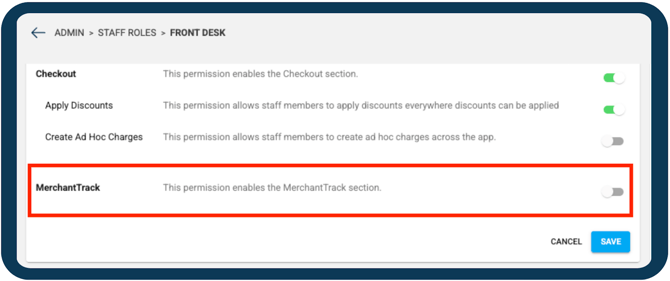
Merchant Track Permission
We've added a new permission for Merchant Track. This can be toggled on/off for any custom staff role but is automatically "on" for any Owner-based roles.
Any Staff members who have a role with the Owner permission will still be able to view Merchant Track.
 Portal Links and Unavailable Passes/Bookings
We’ve improved how our system handles links to passes and bookings. If a pass/booking isn’t available for online purchase, customers will now see a clear message letting them know—no confusion or blank pages. Passes or bookings that are not eligible for online use will be blocked consistently, even if they were already in their cart. This update helps ensure a smoother, more accurate checkout experience.
Shared Membership Updates
-
Updating Shared Membership Status
-
When updating the status of a Shared Membership, the system will now ensure all linked memberships are updated together—whether the change happens immediately or on a future date. This ensures everything stays in sync and updates are applied accurately.
-
- Promo Codes
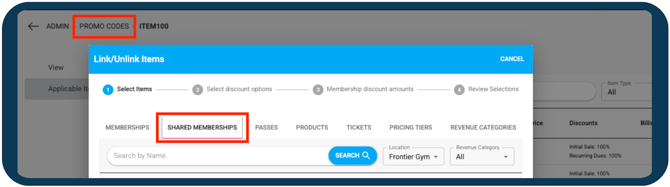
- We’ve added Shared Memberships to promo codes! When adding "Applicable Items" to a promo code, there is a tab for Shared Memberships.
- When adding a shared membership to the cart, the discount options will appear, and Approach will validate promo codes made for shared memberships.
- "Members" Page
- To reduce confusion on Shared Membership pages, If there are no active or on‑hold memberships, the page will display this message: “There are currently no active memberships. Please see the History tab for more information.”
Contract End Date Logic
We’ve updated how contract end dates are calculated for individual and shared memberships to ensure they’re always set accordingly:
- If a membership has a set contract duration, the contract will now end one day after the final bill date.
- If the contract duration is 0, the contract will now end on the start date.
- If the contract duration is not provided, the contract end date will remain blank.
- If a membership has a future start date and 0 billing cycles, the contract end date will now be set to the creation date, allowing it to be canceled immediately if needed.
These changes ensure contract timelines stay accurate and easier to manage.
Portal Cart Age Range Check
We’ve added a new cart check to ensure tickets are still valid before checkout. For ticketed and multi‑day events with age restrictions, the Portal will now verify that each assigned customer meets the required age as of the event date.
If a customer doesn’t meet the requirement, checkout will stop and display: “An assigned customer does not meet ticket requirement, please update your customer ticket assignments.”
This helps prevent invalid ticket purchases and ensures smoother checkout.
March 17th:
Auto Reload when a Page's Location is Changed
When the location is changed in the Main App, the page a user is currently on will now load the relevant data to that new location. For example, if viewing a customer's profile the customer header will now show the new location's relevant information (waivers, etc). %20(10%20x%206%20in).gif?width=670&height=402&name=Untitled%20(11%20x%206%20in)%20(10%20x%206%20in).gif)
March 24th:
Approach Pay clients only - Portal ACH Options
Customers can now add ACH bank accounts in the Portal—either from their profile or during checkout—and manage them by setting a primary account or removing one. All ACH details are stored securely for future payments, and only masked (partially hidden) information will be shown to customers and staff for safety.
- Adding an ACH bank account from a profile
%20(10%20x%206%20in)%20(9%20x%206%20in).gif?width=670&height=446&name=Untitled%20(11%20x%206%20in)%20(10%20x%206%20in)%20(9%20x%206%20in).gif)
- Adding an ACH bank account from the checkout process
%20(10%20x%206%20in)%20(9%20x%206%20in)%20(1).gif?width=670&height=446&name=Untitled%20(11%20x%206%20in)%20(10%20x%206%20in)%20(9%20x%206%20in)%20(1).gif)
This is available for all those who currently have ACH billing enabled. If you do not, no worries! Nothing has changed. If you're interested in adding ACH billing, read about it here!
Membership Status in CRM Check
We updated how membership status is checked in the CRM. Now, when you look up a customer, Approach will follow the rules for where the membership is allowed to check in. This means:
-
If a membership is only allowed to check in at the location where it was purchased, a checkmark will only show on the purchased location.
-
If a membership type allows check‑ins at all locations, a checkmark will show for every location.
Rescheduling Individual Tickets/Assets
We improved how events are found when rescheduling tickets. Events will no longer appear duplicated, and you can now search directly by event ID or booking ID to quickly find the exact event you need.
March 31st:
Order History in the Portal
Customers can now view their full order and billing history directly from their Portal Profile.
A new Orders tab has been added to the customer profile, giving customers quick access to past purchases, billing activity, and receipts. This helps customers understand their charges on their own and reduces billing questions during check‑in.
What the Orders tab will provide:
- See a list of all past orders in one place
- View purchases, auto‑bill payments, pending charges, cancellations, and refunds
- Check the status of each order
- Filter orders by date, status, and location
- Download PDF:
- Individual receipts
- A complete list of their orders
%20(10%20x%206%20in)%20(9%20x%206%20in)%20(2).gif?width=670&height=447&name=Untitled%20(11%20x%206%20in)%20(10%20x%206%20in)%20(9%20x%206%20in)%20(2).gif)
April 13th:
ACH inclusive wording in Membership Type - "Payment methods used for purchasing this membership will always be saved on the customer’s profile"
On Membership Type creation, there was a checkbox labeled "Credit cards used for purchasing this membership will always be saved on the customer’s profile.” We've changed the wording so it's more clear for those who use ACH billing.
Improved Main App Login redirect behavior
Previously, if users were logged out of the Main App and clicked a link, you were taken to the login page but not always returned to your original desired destination after signing in.
This has been improved so that after logging in, they’ll now be redirected back to the page users were trying to access.
Pulse - The new Merchant Track - April 14th
Read more about it here! Announcement: Pulse, coming April 14th
Approach's Merchant track has been replaced with a brand new portal called Pulse. This change will occur automatically when selecting Merchant Track. The wording in Approach.app will change on the 21st to reflect this.
We've pushed some other Minor User improvements to ensure a more secure experience along with stability updates.
April 22nd:
We've pushed some Minor User improvements to ensure a more secure experience along with stability updates.
April 23rd:
Goodbye Merchant Track and Hello Pulse
For Approach Pay (Fullsteam) users awareness
Pulse is the new Merchant Track, a Payments Portal provided by Fullsteam. Read more about it here!
Where previously users saw "Merchant Track" within the Main App, you'll now see "Pulse." This is on the tab and on the permissions toggle.
We've pushed some Minor User improvements to ensure a more secure experience along with stability updates.
April 30th:
We've pushed some Minor User improvements to ensure a more secure experience along with stability updates.
May 12th:
Scanning Gift Cards in the Cart
If someone has a gift card and want to use their gift card code to scan and apply to a purchase, they now can! When going to purchase something in the Cart, you can now select "Scan Gift Card ID," select the field, then scan the code. From here, the gift card id will be entered to apply to the cart.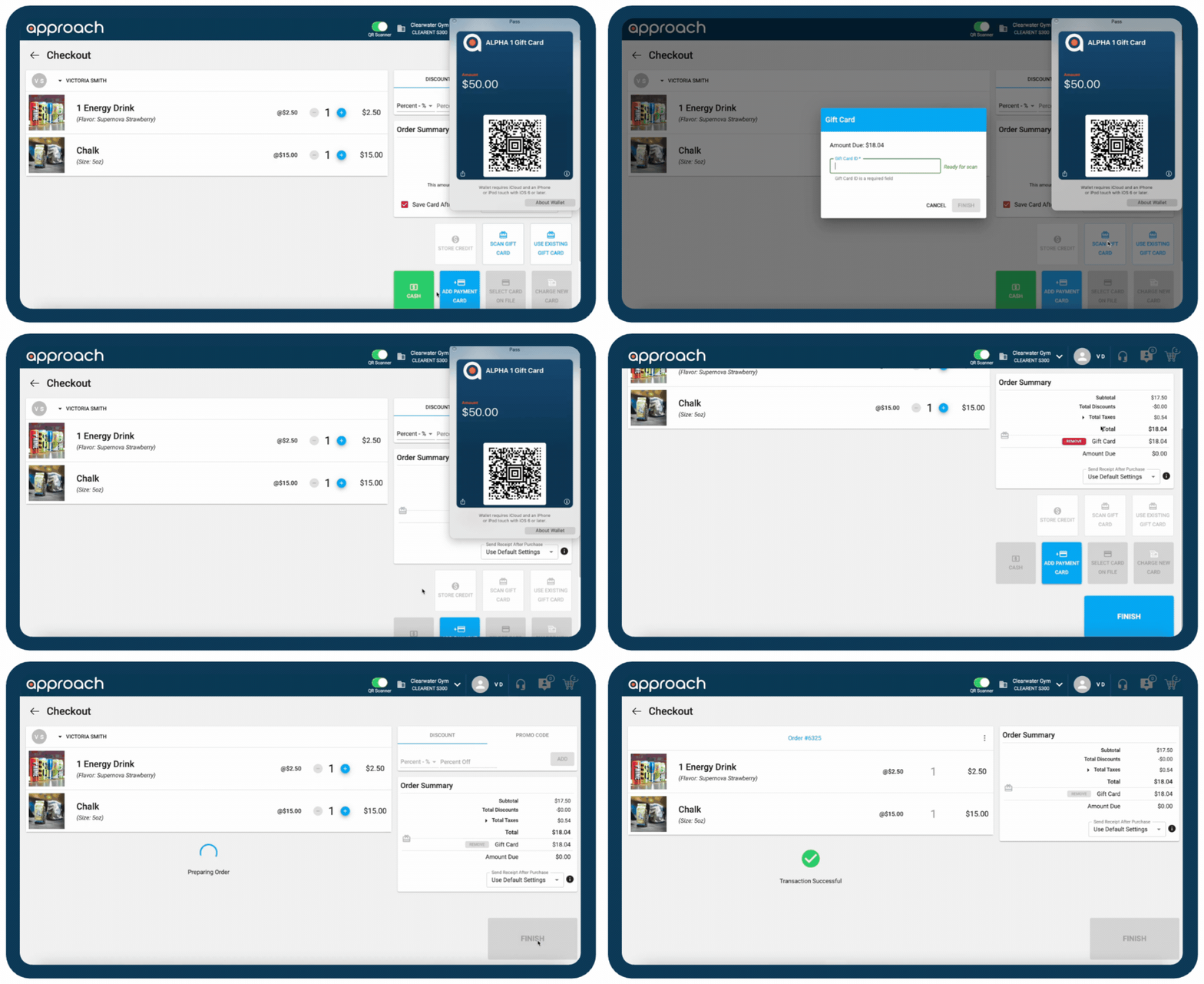
We've pushed some Minor User improvements to ensure a more secure experience along with stability updates.
June 2nd:
Calendar Updates - FAQ
Warnings
-
We've added warnings when editing Bookings to make it more clear when edits will change integral part(s) of the series.
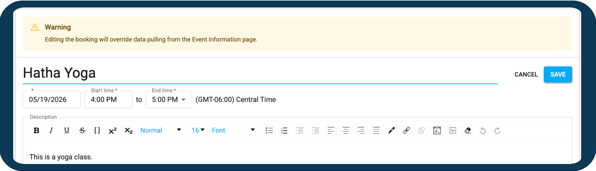
- Green display on a Booking when the information is different from the Event
- For example, on this invoice booking, the description differs from the event description. Therefore the description is in green.
.png?width=530&height=409&name=Copy%20of%20Untitled%20Design%20(1).png)
- For example, on this invoice booking, the description differs from the event description. Therefore the description is in green.
Exceptions and Preview
-
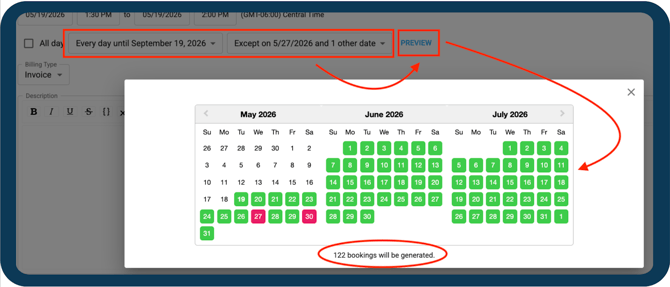
Upon Event ⏰ creation, when setting up the repetition schedule, you can now set Exceptions. These are days/times that the Booking ✏️ will not generate.
-
An example would be a Holiday in which your gym is closed and therefore will not be a Booking that day.
-
-
To take a quick look at what the Event will look like before creation, including the Exceptions, select the Preview. The days the Event is set for will appear green, and Exception days will appear red.
Rescheduling and Preview
-
If you've forgotten to "add Exceptions;" upon Rescheduling the Event, you can set these Exceptions within the Preview. Simply select the date and it will appear red and not generate.
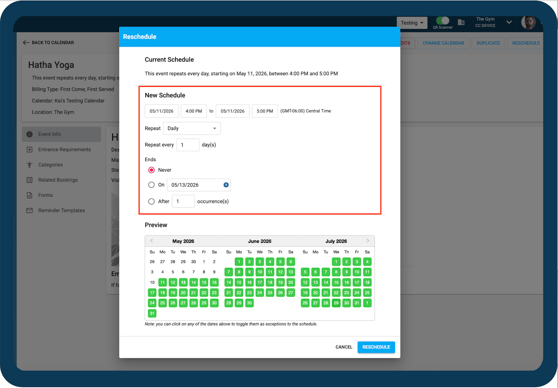
The Preview function is available in the Creation, Reschedule, and Duplicate workflows.
Reverting to Event details
-
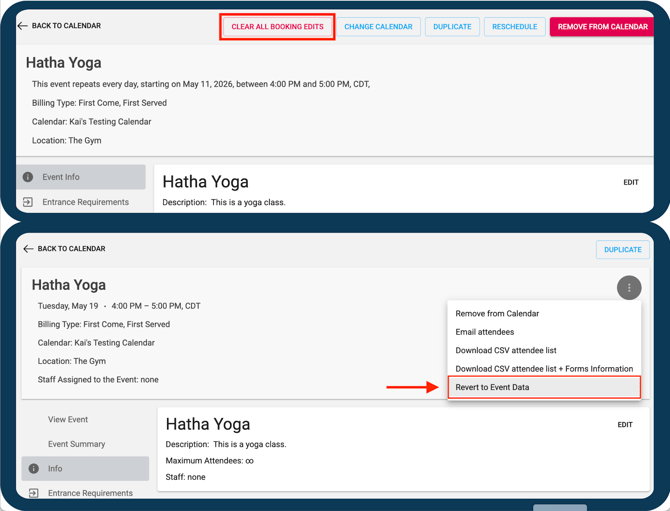
⏰ "Clear all Booking Edits"
-
On the Event ⏰ level, there is an option to "Clear all Booking Edits," this will change all the Bookings within the Event to have the details the Event currently has.
-
-
✏️ "Revert to Event Data"
-
On the Booking✏️ level, within the hamburger, there is an option to "Revert to Event details," this will change that singular Booking to have the details the Event currently has.
-
Booking Generator
- The Booking Generator will now automatically generate based on the event’s "Number of days in advance booking can be registered for" field.
Related Bookings
-
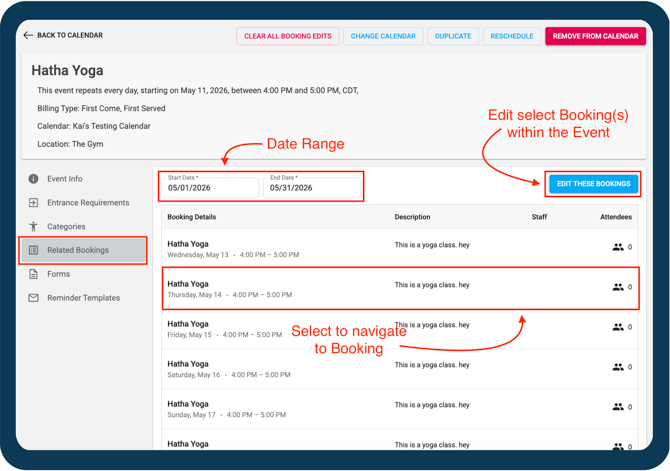
In the Event ⏰, the Related Bookings tab got a makeover! Previously, the tab only displayed a short range, and not so many details. Now, clicking on Related Bookings will show the bookings that were generated for this event for the current month or provided range. Here you can view some of the individual booking information.
- The Date Range automatically displays the current calendar month.
- "Edit these Bookings" includes a pop-up to select individual bookings and edit just those selected.
- Instead of updating bookings 1 by 1 you can now select all the bookings you want and make updates to all the selected bookings at once!
- The Booking Details provide the name, date, time, description, staff, and attendees. Selecting the Booking Detail will link to the Booking.
Do you have more questions? Check this out: https://support.approach.app/knowledge-base/calendar-update-faq
June 10th:
"Edit" For Shared Memberships and Seats 👩👩👧👦
For a Shared Membership seat, we've updated the management so Discounts can be updated or removed from that seat. Simply navigate to the Shared Membership management page, then head to the Members tab to manage individual seat discounts.
June 16th:
Portal Cancellation Terms wording change
When a member is on their Portal profile, and navigates to the Membership tab to view their membership information, the wording was "This membership cannot be canceled online. Please contact the front desk for assistance" for the Cancellation Terms section.
This would not always reflect the correct process, if the Support requests were utilized. To not cause confusion here, the Terms now display: “This membership cannot be canceled online. Please submit a change request.” Then link to the change request forms list.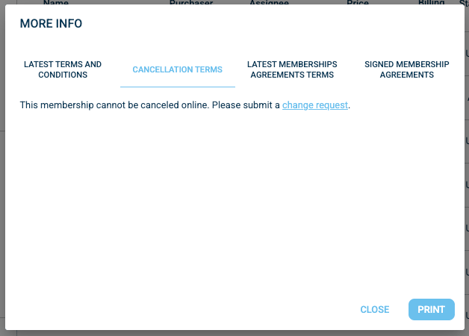
If you do not have Support requests for cancellation, no worries! The user experience will not change here. But check out Support requests here!
Portal "Membership Agreement End Date"
Where Contract End Date used to be, the click to cancel flow shows "Membership Agreement End Date." This wording change reflects the truth that the Contract End Date does not equal the actual Membership's End Date. This will avoid customer confusion around their commitments.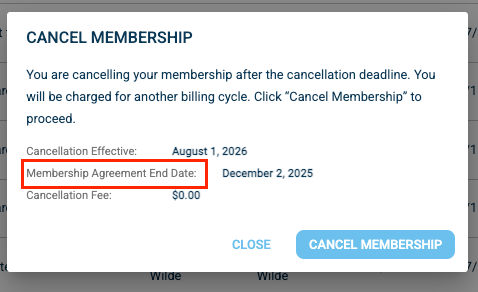
"Sign Document" workflow and Membership Agreements
In the Kiosk, when a customer's attempting to sign a document, Membership Agreements would appear. The point here was these agreements were not inherently attached to the membership the customer had.
In that case, it's available through the "Sign Membership Agreement" flow. This caused some confusion, so we made sure to remove those from the Document workflow!
"Email Document" workflow and Membership Agreements
In the Main app, when on a customer's profile, attempting to send a document, Membership Agreements would appear. The point here was these agreements were not inherently attached to the membership the customer had.
In that case, it's available through the "Send Membership Agreement" flow. This caused some confusion, so we made sure to remove those specifically from the Document workflow!
Bug Fixes 🐞
January 8th:
"My Valid Locations" incorrectly filtering in Support Requests- When going to Support > Requests in the Main App, the filter for "My Valid Locations" would allow view of all locations requests instead of matching their valid locations in their Staff profile. This could be showing more than intended so we fixed it!
Unable to Cancel/Refund Ticket from Event or "My Reservations"- If attempting to cancel or refund a ticket via the event page or a customer's "My Reservations" section, it would not be processed. This then required going into "Order History" to cancel or refund. This didn't seem very efficient so we fixed it!
Portal allowing Invoice Deposits to be purchased more than once- In the Portal, when someone was booking an invoiced event and attempting to pay the deposit, they could go back and add another deposit for the same day/time. We've changed this so it's only possible to add one for the same day/time in the portal cart.
January 13th:
Error cancelling an optional Shared Membership seat- There was an error when attempting to cancel a Shared Membership seat and would not allow the cancellation. We've since fixed this so you can cancel away!
Promo Codes displaying incorrect discounts- For some users, the promo code creation would display a different discount than was being applied. This became confusing for folks, so we squashed this bug!
Editing a Document Templates removes the attached image- When going to edit a Document Template—if there was an image uploaded for the Document—after editing and saving the image would be gone! We tracked down where it went and can assure it will no longer run away.
Portal displaying 'Null' after Promo Code- For some users, after the Promo Code was entered in the Portal, there would also be a 'null' next to the field. The Promo Code would work properly but the 'null' could confuse customers so we fixed this!
January 20th:
Location error in Product Adjustment Logs- When purchasing a product at one location, the adjustment logs would show the inventory decrement occurred at a different location. This would incorrectly report the product's quantity, so we fixed this bug.
'X' status for uploaded Waiver in Customer Search if no expiration- When a manually uploaded waiver had no expiration, the customer search would display a red 'X,' indicating there was not a valid waiver, but there was! So, we squashed this and a green check will appear for these waivers instead.
Customer Pop-Up appears after selecting the back button- When the Customer pop-up would pop-up through an event, when selecting the back button, the pop-up would remain. Our intentions were for the pop-up to not remain if the back button was hit, so that's what we made happen.
Loyalty Points Settings displaying incorrectly- Sometimes, when swapping Locations on the Loyalty Points in the Main App Settings, the settings would not display according to the location's settings. Since we didn't want to confuse everyone, we fixed this!
CRM Search displays incorrect Waiver Status when they hit legal age- When a customer had a valid waiver when they were a minor, then hit legal age, their Waiver needs to be resigned. However, the customer search would still display a checkmark but not allow check-in. Now, the Waiver Status will display the correct status!
January 28th:
Duplicated Variants within a Product- When going through a workflow of enabling and disabling variants and inventory, some variants would then duplicate within the product. We've since fixed this so there are no more duplicates!
Unchecked "Do Not Prorate" on a Membership not respected in the cart- When selling a Membership in the Main App, a bug was preventing the unchecked "do not prorate" from being respected once the Membership was added to a cart. But fear not, this bug has been squashed!
Staff Valid Location not always being respected- When logging out of an employee with access to Location A and then logging in as a different employee with access only to Location B, the second user was incorrectly placed into Location A and could navigate it without permissions. Now, users are correctly loaded into their own authorized location at login, preventing access to any unauthorized locations.
Post-purchase Check-in page crashes when the item is unassigned- If a pending order was then being checked out, the "Check In Now?" page would display an infinite loading screen as long as the order item was not assigned. We intended, despite the item being unassigned, the page not to crash—so we squashed this bug!
Portal Profile Edit Prompt not allowing edit- We fixed an issue where users signing into a new namespace for the first time saw the “Hey, we found your profile information” message, but clicking “No, Edit Profile” closed the prompt instead of opening the editable profile form. Users can now correctly edit and save their profile information during first‑time sign‑in!
February 10th:
Error saving a new Document Template- When attempting to save a new Waiver or new Membership Agreement, there was an error preventing it from saving. This was disruptive so we've gotten that patched up!
Error in Customer Search sorting by Membership Status- An error occurred when attempting to sort by the Membership status in the CRM. Since this is not sortable, it has been disabled to avoid any confusion.
Cancelling an Order with a Product showing an "unpaid" status- For some users, when cancelling an order that had a product in it, the status would change to "unpaid" rather than "cancelled." This was not accurate so we've fixed this!
Portal: Assignee not respected- When a customer was assigning something to another household member, the main app would display the purchaser as the assigning. This did not reflect what the customer wanted, so we've squashed this bug!
Cart reassigns back to the Purchaser if a discount is applied- When a discount is added to a cart with a Pass or Membership, it is reassigned to the Purchaser if it was originally assigned to someone else. But no worries! This is no longer an issue in the Main App.
February 17th:
Promo Code: "Review Selections" not showing all products applied- When linking product items to a promo code, the "Review Selections" page would not show the correct amount. It would still link said products, but this can become confusing so we went ahead and squashed this bug!
Event Description not formatted correctly when rescheduling- In the rescheduling process for an event, in some cases, the Event Description was not being formatted correctly. This caused the Event Description to appear incorrectly. But now, no worries! The Event Description will appear perfectly every time!
"Do Not Prorate" option appearing for Date of Purchase Memberships- DOP membership types don’t include proration, so the ‘Do Not Prorate’ setting was basically pretending to be helpful. Since it had no business being there, we kindly showed it the door and removed it!
February 24th:
"Valid Locations" column in Document Templates blank- In Document Templates, the column for "Valid Locations" was appearing blank while there were locations associated with the document. This would be helpful to show so we squashed this bug!
Hold on Shared Membership crashing page- When attempting to put a whole Shared Membership on hold, a bug would cause the page to crash and the memberships were not put on hold. Since sometimes members need to be able to put their memberships on hold, we've fixed this!
Portal: No visual indication of successfully signed Membership Agreement- If a customer signed a Membership Agreement in the Portal, the prompt would simply grey out. Rather than having customers not have any indication of a successful signing, we added a checkmark.
FCFS Check-in showing as "General Hours"- When a customer was checked-in for a First Come, First Serve Event, in the customer's profile under check-ins, the event-type would show as "General Hours" rather than FCFS.
"Email Unsubmitted Forms" shows cancelled reservations- In a First Come, First Serve Event, the "Email Unsubmitted Forms" workflow would display folks with cancelled reservations. If they're cancelled, they probably don't want to be sent the corresponding form! So we've fixed this so they won't appear anymore.
Depleted Enhanced GP displays as if usable on check-in- When some customers had an Enhanced Guest Pass, even after the pass was depleted it would sometimes still appear as usable for check-in. While it would still deny check-in, this could confuse some folks so we went ahead and squashed the bug!
March 3rd:
Inventory Audit for Points redemption typo- This is embarrassing..but we all make mistakes sometimes. In the description for an Inventory Audit, the it said "Iventory Log for points redemption." But we like to own up to our mistakes, and fix them, so we have!
Putting a Hold on a future cancelled SM removes cancellation- If a Shared Membership already had an cancel date set, then they were put on hold, the end date would be removed. We didn't want to confuse folks so we've squashed this bug!
Missing "Switch Carts" pop-up for Invoiced Events on the Portal- Customers were able to log into the Portal under one location and then browse invoiced events at other locations without being notified that their shopping cart needed to switch locations. This update restores the location‑switch confirmation message, ensuring purchases are correctly assigned to the right location!
Sorting not respected in Product Management page- When adding a variant to a product, the sorting we had implemented was not working properly. But we've fixed this!
Time Zone not respected for Enhanced GP Check-Ins- For some folks, their location's time zone was not respected for Enhanced Guest Passes and therefore would not allow for check-in. This was confusing so we've squashed this bug!
Product still showing as a Variant even after Variant types had been added- When adding variants to a product, the base product would still show when adding/updating inventory from the product's page. Since inventory should just be updated based on the variants, we've made sure the base product will not show anymore!
Customer Classifications age range not respected- When a customer classification had an age range, it would not be respected once being assigned to a customer if they were on the minimum or maximum age. This was very inconvenient so we went ahead and squashed this bug!
Credit in Days sometimes not getting set- In some cases, the credit in days for a membership was not being set. This could've caused issues when putting a membership on hold, then resuming it where the prorated amount would show incorrectly. We don't want that to continue so we've found and smashed this bug!
Calendar View options not viewing properly on black background- When in the Portal and once the "Schedule" tab was selected, if the background was black, the options to switch the view (list or day view) would not appear correctly. While this did not come up often, it would still be confusing for folks so we've made sure you can see the options!
We've pushed some other Minor Bug Fixes to ensure a more secure experience along with stability updates, for a steady, smooth, and responsive Portal.
March 11th:
Putting a Hold on a future cancelled individual SM removes cancellation- If an individual Shared Membership already had an cancel date set, then they were put on hold, the end date would be removed. We didn't want to confuse folks so we've squashed this bug!
Contract dates not getting set for SM- When purchasing a shared memberships, the system wasn't saving the contract start or end dates. These fields are being left blank, but they should be automatically populated when the membership is created, so we made it so!
Shared Memberships with flat discount billing stuck- Some Shared Memberships sold with a flat discount (making the initial purchase $0) would not auto‑bill since the sale. Since Shared memberships should auto‑bill on their scheduled bill dates, and corresponding orders and transactions should be created in the system we've fixed this.
Gift Card totals incorrectly included in ‘Total Excluding Gift Cards’- When creating a new Revenue Category report, the “Total excluding Gift Cards” value was incorrectly adding in all Gift Card revenue. It now instead excludes all Gift Card totals entirely!
Future Age Eligibility not updating correctly- Customers who would soon age out of a ticket’s age range were still appearing in the assignment dropdown. The system wasn't correctly removing people whose upcoming birthdays make them ineligible. But fear not! We've fixed this bug!
Duplicate Promo Codes merge instead of staying separate- If you were to create a promo code using a specific code name, and then create another promo code with that same name, the new one would combine with the original instead of being treated as a separate promo code. Since this could cause some confusion, we made sure there would be no duplicates!
Expired Passes still showing as Current- When a pass reached its expiration date and changes to an “expired” status, it would still appear under the “My Plans” → “Current” filter on the day it expires. Now, on the pass’s expiration date, it no longer appears in the “Current” filter!
Cancelled Orders Not Showing Transaction Status for Adyen Payments- When an Adyen order paid with a terminal or saved card was cancelled, the transaction status and status description appeared blank in the order details—even though the correct information existed on the backend. So, we made sure they matched!
Refund Wizard Incorrectly Marks All Items as Cancelled- After issuing a partial refund and cancelling only specific items, reopening the refund wizard incorrectly labeled all items in the order as “(cancelled),” even though some items were still active and were never refunded or cancelled. Since this can be confusing, we squashed this bug!
Duplicated Events Can’t Be Removed from Calendar- When an event was duplicated, the duplicated version appeared greyed out on the Main App calendar. If you were to remove it using Remove from Calendar → Cancel the bookings, an error would appear and would not be deleted. Now, the duplicated event will be removed from the calendar successfully, just like any other greyed‑out event that wasn’t created through duplication.
Deep links allow for purchase when Pass Type is set to "Not for online use or sale"- When a Pass type is set to “Not for online use or sale” customer’s with a deep link for the pass saved, could still successfully purchase the pass in the Portal. This bug has been squashed!
Deep linked "Ticketed events" Tickets Adding to Cart for Events at Capacity- When an events was at full capacity, if a customer had a saved deep link of the ticket to that event, they could still purchase the ticket and get into the event. The maximum capacity for events can no longer be violated like this!
Ability to Checkout Expired Promo Codes in Portal Cart- If a promo code was added to a Portal cart prior to the promo code expiration date and the cart was left active/open past the promo codes expiration date, customers could still successfully check out the active cart with the promo code applied. This is no more!
Reminder Templates not sending if 'Disable Default Registration Email' is "Yes"- When a booking was made and there is a reminder template attached to the event, it will not send to the organizer/guest as long as the ‘Disable Default Registration Email’ is “Yes". Now, it will properly send even if Disable Default Registration Email’ is set to “Yes”.
Guest “Max number of usage per customer” error when not used- When attempting to add a promo code at checkout in the Portal that had a set number for “Max number of usage per customer”, an error "This promo code is not valid for this customer" would be thrown, despite the customer having no prior usage of the code. This was only occurring for Guest Checkout, but now your guests can enjoy your promo codes!
Recurring Membership Type allowing save with '0' Billing Cycles- When creating/editing a recurring membership type, you can make the Contract term: billing cycles '0,' then when attempting to cancel via the Portal, it causes a blank screen. We've put some protections in place to ensure "0" cannot be saved!
Quick/barcode checkins warning message isn't displaying- When using the Main App's "/barcode -checkins" page, customer's who had an outstanding balance or missing membership agreement were not being flagged on checkin. Now customer's will properly be flagged on check in when using the "/barcode -checkins" page!
AUS: Unable to Complete Partial Refunds- After successfully partially refunding an order (back to the card used), staff were unable to complete a refund for the remaining amount on that order. Now staff will be able to refund the remaining amount on partial refunded orders!
Credit in Days Not Getting Set for Some Membership Holds- There was an issue of the "credit in days" not being set for some memberships when they were put on hold, resulting in the proration calculation being off. This bug is no more!
March 12 Hotfix:
Valid Guest Passes not checking-in- Some users were experiencing an issue where Guest Pass folks were not able to check-in. We know it's important to check people in, so we fixed this!
Error when attempting to "Pay Balance" on invoiced events- When attempting to pay the balance for an invoiced event, an error came up and the balance would not add to the cart. But now you can pay away!
March 17th:
Staff were able to Change a Created Document's Type - After a document type of "waiver" or "membership agreement" were created, the system was allowing staff to change that created document's type. Signed documents must remain in the state they were originally signed, so this bug was fixed!
Editing Document Template Removes Photo - Previously, if a document template had a header photo and you edited one of the fields within this template, once you saved this edit the header photo was removed. This is no longer happening!
Submission Form Issue (Australia) - For our Australian clients, they've been experiencing an issue that is causing forms to not open when sent to customers. This bug has been patched!
March 24th:
Saved Card not appearing for checkout in the Portal- If a customer had a saved card, when logged into the Portal, they could not use the saved card for checkout. This was inconvenient for some folks so we squashed this bug!
"Current" Filter not showing correct Reservations- When a ticket was viewed in "My Plans" under the ticket holder's profile on the day of the event, it would only appear under the "All" filter. Since this ticket would be considered "Current," we've made it so!
Event Type displaying incorrectly for FCFS Check-in- The Event Type on a customer's check-in for a First Come, First Serve event would display as "General Hours." We knew that should've been "First Come, First Serve" instead so we changed it!
Merged Customer Cart not removed post-merge- If a customer had an open cart, then that customer profile was merged, the cart would not be deleted. Since the cart could not be deleted afterwards and attempts caused an error, we've made sure that when a customer is merged, any open carts of theirs will be deleted!
Formatting Error when Duplicating a Ticketed Event- When going through the duplication process on a Ticketed event, sometimes the text was rendering incorrectly. This was confusing for some so we've squashed this bug!
Cash drawer "Network Error" appearing randomly sometimes- The cash drawer was made to open/close within the same day, but sometimes it would still display a "Network Error." We've fixed this and added more logging so we can view cash drawer issues better!
Cancelled Order didn't Update "Unpaid" status sometimes- When cancelling a membership order would sometimes leave the membership showing the wrong number of bills. This happened in rare cases where the membership was already active, and only the order—not the items—was cancelled. The system now correctly updates the membership’s bill counts so everything stays accurate after a cancellation!
Cannot send Membership Agreement to Secondary Email- If a customer only had a secondary email on their account and not a primary email listed, staff were unable to ‘Email Membership Agreement.' An error claiming there was no email to send the agreement to blocked this. But now, the agreement will send to the customer's secondary email!
Cannot send Default Waiver to Secondary Email- If a customer only had a secondary email on their account and not a primary email listed, staff were unable to ‘Email Default Waiver.' An error claiming there was no email to send the waiver to blocked this. But now, the waiver will send to the customer's secondary email!
March 31st:
"Active Membership" displaying incorrectly day-of expiration- If a membership was cancelled, on the day of expiration the customer header "Active Memberships" would still show '1' and be green instead of red. Since the membership wouldn't allow for check-in either, we wanted to make sure it made sense. So now, "Active Membership" will display red on the day of cancellation.
Scanning a Ticket QR Code allows multiple check-ins- When checking in someone via a QR code multiple times for an event, there would not be anything indicating they had already been checked in! This could be confusing for folks, so we've squashed this bug!
Kiosk cannot go "back" after beginning 'Sign Document' session- If a customer did not have other members in their household, once a signing session had begun on the kiosk, they could not select the "back" button within the app. The kiosk would just take them in an endless loop trying to go back, so to prevent madness, we've fixed this!
April 13th:
Multi-day Events can be created without a end date- Users could create or edit a multi‑day event and select “Ends on” without choosing an end date. This allowed the event to be saved with no end date at all, including cases where an existing end date was removed. Since multi-day events need an end date, we've fixed this!
Multi-day Events can be rescheduled without a end date- Users could reschedule a multi‑day event and select “Ends on” without selecting an end date. This allowed the event to be saved with no end date at all. Since multi-day events need an end date, we've fixed this!
"No" Age‑Restriction behavior not respected for ticketed events- If a multi‑day or ticket type included an age restriction, the Portal would block a purchase even when the event itself was set to not enforce age restrictions. This happened when no one in the household matched the ticket’s age range. This has been fixed so that age restrictions are only enforced when the event is configured to require them.
QR code scan for Multi-day ticket crashes page- When a QR code used for a multi-day ticketed event was scanned, the page would crash and not check the guest in. Now, scan away! There will be an option to check this customer in.
Reservations "Past" filter showing Current and Future Bookings- In a customer's profile under "Reservations," when filtering to 'Past' reservations, the bookings that appeared included current and future events. Since this does not follow the filter, we fixed this bug!
Reservations page showing pre-rescheduled Events- In a customer's profile under "Reservations," if their reservation was rescheduled, the previous booking would appear. This could cause confusion for folks so we squashed this!
Some Loyalty Points stopped being awarded- Some customers were not receiving loyalty points for check‑ins or purchases, even though loyalty points were enabled and no settings had been changed. This started after a system update and would affect activity going forward. The issue has been fixed so that loyalty points are now awarded correctly based on each location’s existing settings, without requiring any re‑saving or adjustments by staff.
Promo Code "Recurring Dues Discount" not applied to Memberships- When using a Promo Code for a checkout the "Recurring Dues Discount" would not be applied to the membership. The "Initial Discount" was being applied instead. This was not what we intended, so we've gone ahead and fixed it!
Refunding one Order item returns Inventory for entire Order- When an Order had more than one Product with Inventory, then one of those items were returned (but not all), the Inventory would show as if all those Products were returned. This does not reflect the true Inventory count, so we've fixed this bug!
April 22nd:
Failed transaction attempt creates two orders- When checking out via the CC device, if there was a card reader error, Approach would remain in an infinite loading wheel. Refreshing the page to successfully check out would result in two orders on the customers account. We've resolved this so that refreshing the page will not create a duplicate order!
Ticket Removed from Cart if Customer just met age requirement- An age‑restricted ticket could be removed from the cart when assigning it to a customer who just met the age requirement. The age calculation has been corrected so that customers who meet the minimum age requirement can now be assigned tickets without them being removed from the cart!
Inactive Products Appearing When Scanning Product Barcodes- We fixed an issue where scanning a product barcode on the Shop screen would return products that were marked as Inactive and staff were able to sell those inactive products as a result. The system now checks whether the base product is active before showing it in the scan results. Only active products and their variants will appear when a barcode is scanned!
Unable to sign waiver for household members on the Kiosk- When creating a customer profile on the Kiosk, newly added household members (minors) are not being included in the waiver signing session attempted by the parent/guardian. We've resolved this so that any household members that the parent/guardian selects to sign for will be included in the signing session!
Waiver status displaying incorrectly - If a customer has a valid waiver for location A, when checking in via the Kiosk it will appear as if they have a valid waiver for the current location (location B). We've resolved this so that if the customer does not have a valid waiver for the location they are visiting, it will display as such on the Kiosk!
Booking Check-in allowed at a different Location than Booking- When logging in to the Main App and selecting location A, if staff changed the location on the Main App Calendar to location B to check in a customer to an event happening at location B, the check in record would display location A as where the check in occurred. We've resolved this so that the check in must be completed at the location of the event!
Checkout page show valid membership on customers without valid waivers- When a minor becomes of legal age, the waiver that was previously signed by the parent/guardian was still appearing as "Valid"on the customer profile, even though the check in would fail due to the customer needing to sign their own waiver as an adult. We've resolved this visual bug so that the waiver will not appear valid!
April 23rd:
Unable to "Add Member" to purchased Shared Membership- For some shared membership setups, staff were unable to ‘Add Member” to a shared membership after it’s been purchased as they ran into an error. We've resolved this so that you can add members to all shared memberships that allow for it!
Portal Schedule not loading for some Locations- For some, when attempting to enter the Schedule on the Portal, there would be an error and nothing appeared. This error was not the behavior we wanted to see so we squashed this bug!
April 30th:
Promo Code Discount on Shared Membership Date incorrect- An issue was causing promo code discounts on shared memberships to end later than expected. The discount end date was being calculated from the payment date instead of the purchase date. This has been corrected so discounts now end based on the original purchase date and apply for the correct number of billing cycles.
Merged Profile showing error in Notes- Sometimes when a profile was merged, there would not be a staff associated with a Note, which caused an error. We've fixed this so Notes will merge properly and have staff associated.
May 1st Hotfix:
Adding a Category to an Event results in an error- When attempting to add a Category to an Event, an error would pop up. This would also occur within the Duplication workflow. This caused some issues with Categories in the Portal, so we've fixed this bug!
May 12th:
Membership Cancellation Date mismatch- When canceling a membership at renewal, the cancellation date shown to customers in the portal did not match the actual cancellation date applied. This could cause confusion, as the displayed “Cancellation Effective Date” differed from the final billing date so we fixed it!
Guest passes not available for same-day Check-In- In some cases, customers were unable to check in using a guest pass on the same day it was assigned. The pass would not appear during check-in, even though it had been successfully added. Now, guests can check in with ease!
Incorrect Cancellation Fee shown for Shared Memberships- Previously, when canceling a shared membership after the contract term had already ended, the system incorrectly showed that a cancellation fee was required. This caused confusion, as fees should only apply when canceling before the contract term ends. This has been fixed!
Incorrect Contract Dates for Memberships with 0 billing cycles- Previously, for some AU-based clients, memberships set with “0 billing cycle” contract terms displayed incorrect contract start and end dates. In some cases, the contract start date appeared one day earlier than the actual membership start (purchase) date. But we've corrected this!
Reorder point resetting after purchase- Previously, when a reorder point was set for a product, completing a purchase could cause that value to reset instead of remaining unchanged. This also impacted inventory reporting, including QuickSight counts. But, reorder point values now remain consistent after purchases, as expected!
May 28th Hotfix:
Customer Portal Card Entry Issue: There was an issue impacting some customer's ability to add new cards through the Portal. This bug has been resolved!
Portal Event Schedule Error: The Portal Schedule was displaying an error “activitys is not defined on the model” inhibiting the ability to view events. This bug has been squashed!
June 10th:
Double Check-in caused unnecessary Error Message- An error message could appear if the same customer was checked in to the same event at the same time from multiple browser tabs. The system now handles this scenario correctly to prevent duplicate check‑ins and unnecessary error notifications.
Membership Cancellation Date mismatch- When canceling a membership at renewal, the cancellation date shown to customers in the portal did not match the actual cancellation date applied. This could cause confusion, as the displayed “Cancellation Effective Date” differed from the final billing date so we fixed it!
Cannot change visibility on singular Booking- When on a Booking (not associated with an Event Series) and attempting to edit to change the Portal visibility public/private, the new setting would not change. This could cause some issues for reservations so we squashed this bug!
Duplicating Booking not saving- When on a Booking (not associated with an Event Series) and attempting to duplicate it, the new Booking would not save and would not be created. To avoid the extra work of creating another Booking from scratch, we wanted to get this fixed!
Error attempting to Refresh ACH Transactions- For some clients, refreshing the ACH transaction page resulted in an error. Since folks need to be able to see the status of their ACH transactions, we fixed this!
"Add Member" on SM not creating a seat- On a Shared Membership, when attempting to add another member, it would not create a seat to be assigned out. While this was only for additional seats (not required) this still impeded purchases. We said we need to squash this bug, so we did!
End not set for event when "Ends after _ occurrences"- A Multi-day ticketed event created with the schedule “Ends after _ occurrences” would not set an end where intended. This resulted in an “Event has ended” error when attempting to purchase the ticket, so we fixed this!
"Add/Update Primary Card" not available for non-ACH Portals- When a Portal did not have ACH enabled, the "Add/Update Primary Card" was not pulling up a card entry option. Since we want folks to be able to add a new card if needed, we squashed this bug!
June 10th Hotfix:
Creating a single Booking resulted in Error- When attempting to create one booking, an error would pop-up unnecessarily! This wasn't what we intended, so we squashed this bug as soon as possible!
Barcode check-in failures- When attempting to check-in via the kiosk with a barcode, the check-in would fail even if the customer had the required membership/pass/waiver. We imagine this would cause some issues for folks so we fixed it!
June 16th:
Ticketed Event Portal Link unnecessary- On a Ticketed Event 🕒, the Portal link 🌐 that would take the user to the Portal purchase flow was not bringing up a link. This was because there is not a Portal link to the Event page, but a Booking page. Because this was confusing, we went ahead and just removed the 🌐!
Signed MA for a SM appearing red in customer header- In the Main App customer header, the Membership Agreement would still appear red even if the Shared Membership MA was signed. This could be confusing for staff so we've made sure it will appear green. So long as the agreement is signed.
SM "Add Members" not displaying Price in Review section- When adding members to a Shared Membership, the Item total for the additional seats would not appear in the Review section, before adding to cart. This was not clear for staff or customers so we've squashed this bug!
June 23rd:
Cancellation Date reverting after custom entry- After selecting 'enter' once typing in a date into the custom date field, the date would revert back to the current date. This was in the cancellation workflow for a membership. But this bug has been squashed so folks can enter the date of their choice!
FCFS Rescheduled not updating- When a one‑time First Come, First Serve booking was moved to an earlier date, the event dates may not have correctly updated. While the new start date appears correctly, the end date could have remained outdated. This could result in inaccurate event timing being shown so we've made sure to fix this bug!
Booking Titles not matching- Within a Booking, if you were to change the name of the Booking, it wouldn't match with the title at the top. This showed an inconsistency within the Booking, so we ensured the title and name will match after edit!
Ticket Reschedule Date Range incorrect- When selecting a ticket to reschedule, there would be an extra day beyond the chosen end date in the date range field. This would prevent events from being rescheduled to that day and trigger an error. Since we didn't want that error, we made sure that date range was respected.
Kiosk minor option to sign MA- For minors, the Membership Agreement would still appear for signage in the Kiosk. They were getting an error when attempting, but that could cause some confusion so we simply wanted to remove that option!
Inventory Audit PDF not respecting location selection- When downloading a completed inventory audit, the PDF would include product data from all locations instead of just the selected one. This occurred for certain products, leading to extra, irrelevant information appearing in the report. As a result, the downloaded audit may not accurately reflect the chosen location so we made sure to change this! Now, only the selected location's product data will appear.
Kiosk MA not showing purchased memberships- When going through the Kiosk Membership Agreement signing flow, the list would only include assigned memberships. Since folks need to be able to sign for minors, we ensured both assigned and purchased memberships appear.